
Simple Text-Text Icon Creator3.6.3 - Get APK
You'll be able to download in few seconds.
Publisher Description
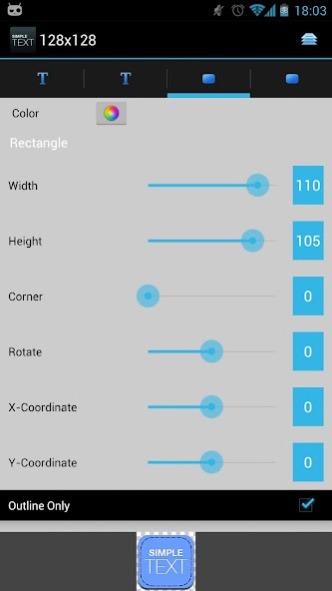


Simple Text is an application creating minimalistic text icon for LauncherPro, ADW Launcher, Go Launcher, Desktop Visualizer... If you love Clockr or Minimalistic Text, you're gonna love this one :P
With this app you can create bunch of text icons really fast without using Photoshop or any photo editors
"Icons created with Simple Text look surprisingly good as dock icon replacements, giving it a unique, elegant look." - addictivetips.com
"Easy and customizable text icon makes screen minimalistic." – appeggs.com
Since version 3.0, you can use Simple Text icon or image as a widget ( just like Desktop VisualizeR )
FEATURES:
- Widget supports
- Save style
- RGB color picker
- Enter color in hexa value
- Alpha transparency
- Adjustable background color, shape
- Adjustable text position, alignment, size...
- Gradient Effect
- Text rotation
- Cusomizable shadow effect
- Font supports:
-- Default fonts
-- External font directory: /sdcard/Simple Text/fonts
...
How to use with ADW Launcher or ADW Launcher EX:
1. Long-press an app icon
2. Select "Edit"
3. Tap on the app icon
4. Select "ADWTheme IconPacks"
5. Choose Simple Text
6. Create your icon
7. Press Menu, then "Save Icon"
How to use with other Launchers ( LauncherPro, GO Launcher... ):
1] Run Simple Text in your application list
2] Create your icon
3] Press Menu, then "Save Icon"
4] Use your launchers specific change icon option and browse to your images ( stored in /sdcard/Simple Text )
FAQs:
[Q] How do I can add more fonts?
[A] Put your fonts into /sdcard/Simple Text/fonts ( only supports TTF format )
[Q] Can I enter color in hexa value?
[A] Yes, you can. Open color picker dialog and click on new color rectangle
[Q] How to enter slider value manually?
[A] Just click on slider's text value
Thanks to Daniel Nilsson for his awesome color picker ;)
Thanks to Christian, Eddie for screenshots.
Thanks to coldfustion for tutorial video
Please don't use comment to request features or report bugs. Email me instead
If you have any questions, feedbacks or you think you can help me in translating to another language, don’t hesitate to contact me via redphoenix89@yahoo.com. I would really appreciate that
About Simple Text-Text Icon Creator
The company that develops Simple Text-Text Icon Creator is CodeKiemCom. The latest version released by its developer is 3.6.3.
To install Simple Text-Text Icon Creator on your Android device, just click the green Continue To App button above to start the installation process. The app is listed on our website since 2012-11-13 and was downloaded 0 times. We have already checked if the download link is safe, however for your own protection we recommend that you scan the downloaded app with your antivirus. Your antivirus may detect the Simple Text-Text Icon Creator as malware as malware if the download link to com.redphx.simpletext is broken.
How to install Simple Text-Text Icon Creator on your Android device:
- Click on the Continue To App button on our website. This will redirect you to Google Play.
- Once the Simple Text-Text Icon Creator is shown in the Google Play listing of your Android device, you can start its download and installation. Tap on the Install button located below the search bar and to the right of the app icon.
- A pop-up window with the permissions required by Simple Text-Text Icon Creator will be shown. Click on Accept to continue the process.
- Simple Text-Text Icon Creator will be downloaded onto your device, displaying a progress. Once the download completes, the installation will start and you'll get a notification after the installation is finished.
Program Details
System requirements
Download information
Pricing
Version History
version 3.6.3
posted on 2012-11-13
#3.6.3: 11/13/2012,[-] Fix: ThemeX icons issues ( when creating Shortcuts or Widgets ),[-] Fix: Keyboard didn't show up on some devices,#3.6.2: 11/09/2012,[-] Fix: fonts didn't show in font dialog on 2.x devices,Don't forget to buy donated version/comment if you want to support me :)
version 2.4.1
posted on 2011-05-22
Several fixes and updates
Disclaimer
External Download
We do not host Simple Text-Text Icon Creator on our servers. We did not scan it for viruses, adware, spyware or other type of malware. This app is hosted by Galad and passed their terms and conditions to be listed there. We recommend caution when installing it.
The APK Download link for Simple Text-Text Icon Creator is provided to you by apps112.com without any warranties, representations or guarantees of any kind, so access it at your own risk.
If you have questions regarding this particular app contact the publisher directly. For questions about the functionalities of apps112.com contact us.
